<?xml version="1.0" encoding="utf-8"?><feed xmlns="http://www.w3.org/2005/Atom" xml:lang="en"><generator uri="https://jekyllrb.com/" version="3.10.0">Jekyll</generator><link href="https://lyingloong.github.io/feed.xml" rel="self" type="application/atom+xml" /><link href="https://lyingloong.github.io/" rel="alternate" type="text/html" hreflang="en" /><updated>2026-11-09T05:08:03+00:00</updated><id>https://lyingloong.github.io/feed.xml</id><title type="html">Hao Wang</title><subtitle>Hao Wang is a B.Eng. student in Computer Science at USTC, working on LLM post-training and agentic reinforcement learning. Incoming graduate student at MIRA Lab.</subtitle><author><name>Hao Wang</name></author><entry xml:lang="zh-CN"><title type="html">我是如何用 DSH 插件构建我的开发工作流的</title><link href="https://lyingloong.github.io/2026/11/08/agent-teams-workflow.html" rel="alternate" type="text/html" title="我是如何用 DSH 插件构建我的开发工作流的" /><published>2026-11-08T00:00:00+00:00</published><updated>2026-11-08T00:00:00+00:00</updated><id>https://lyingloong.github.io/2026/11/08/agent-teams-workflow</id><content type="html" xml:base="https://lyingloong.github.io/2026/11/08/agent-teams-workflow.html"><![CDATA[<p>DSH 的插件机制很灵活。它不只是给聊天窗加工具，而是可以让我定义一个长期存在的 agent：有自己的角色、工具、任务和调度逻辑。</p>

<p>为了尽量发挥 AI 在项目开发里的作用，我用开源的 <code class="language-plaintext highlighter-rouge">dsh-agent-teams</code> 插件搭了一个自动化开发工作流。核心思路是：让多个 agent 按角色协作，走 GitHub 的 PR 流程开发，而不是让一个模型在一个会话里从头写到尾。</p>

<h2 id="具体设计">具体设计</h2>

<p>我把开发拆成几个角色：</p>

<ul>
  <li>需求师：把想法写成可执行的规格；</li>
  <li>工程师：在独立 worktree 里实现，提 PR；</li>
  <li>审查师：独立验证和审查，不直接相信实现者；</li>
  <li>队长：负责任务调度、PR 跟进和异常处理。</li>
</ul>

<p>一个任务大致这样流转：</p>

<div class="language-text highlighter-rouge"><div class="highlight"><pre class="highlight"><code>需求规格
  → 独立 worktree 实现
  → 提 PR
  → 独立验证
  → 独立审查
  → 待合并池
  → 人工 / Codex 合并
</code></pre></div></div>

<p>几个关键约束：</p>

<ul>
  <li>每个任务从最新 <code class="language-plaintext highlighter-rouge">main</code> 拉独立 worktree，不在主目录混改；</li>
  <li>任务写成契约：目标、验收、改动范围、验证命令；</li>
  <li>实现、验证、审查必须是不同的人；</li>
  <li>验证绑定具体 commit，并看真实 CI，不只看本地测试；</li>
  <li>审查不通过就返工，修完重新验证/审查；</li>
  <li>合并权保留给人或 Codex，队长和成员不自动合并。</li>
</ul>

<p>队长负责看当前有哪些任务在跑、哪些卡在验证或审查、哪些在等合并，并处理冲突、CI 红灯、额度不足之类的问题。</p>

<h2 id="效果">效果</h2>

<p>用这种方式，我累计完成了 <strong>34 个 PR、112 个 commit</strong>。</p>

<p>但真正跑起来之后，也暴露了几个问题：</p>

<ol>
  <li><strong>不能完全自动化。</strong> 需求取舍、合并顺序、冲突处理、验证结论的可信度，仍然需要人来判断。</li>
  <li><strong>workflow 不稳定，很难稳定、持续地开发。</strong> Agent 会失败、上下文会超限、provider 会限流；队长上下文累计后会漂移，状态和真实仓库对不上；成员也经常要因额度或工具问题移除重加，旧任务重排。最后仍然需要人不断中断、纠正、重新给边界。</li>
  <li><strong>任务通常需要队长手动派发和催办。</strong> 自动调度并不总是可靠，失败、暂停、换人之后都要重新派任务，队长实际上变成了调度员。</li>
</ol>

<p>所以我又做了一个新的插件：<a href="https://lyingloong.github.io/dsh-auto-workflow/"><code class="language-plaintext highlighter-rouge">dsh-auto-workflow</code></a>。</p>

<p>它要解决的核心问题，是把 workflow 从队长的会话上下文里拿出来：流程状态、任务和调度规则由插件持久化管理，而不是靠 captain 记住一切。这样才有机会减少漂移，让自动化开发变得可持续。</p>

<p><code class="language-plaintext highlighter-rouge">dsh-auto-workflow</code> 还在开发中。这篇算是对上一版实践的一个阶段记录：它确实能跑，也确实完成了很多工作，但离“稳定持续的自动化开发”还有距离。</p>]]></content><author><name>{&quot;bold&quot;=&gt;true}</name></author><category term="dsh" /><category term="agent" /><category term="workflow" /><summary type="html"><![CDATA[用 dsh-agent-teams 搭自动化开发流的一次实践记录：角色分工、PR 流程，以及为什么它还不够稳定。]]></summary></entry><entry xml:lang="en"><title type="html">DR-CoA: Reflection and Replanning for Tool-Using Agents</title><link href="https://lyingloong.github.io/2026/08/05/workbench-coa.html" rel="alternate" type="text/html" title="DR-CoA: Reflection and Replanning for Tool-Using Agents" /><published>2026-08-05T00:00:00+00:00</published><updated>2026-08-05T00:00:00+00:00</updated><id>https://lyingloong.github.io/2026/08/05/workbench-coa</id><content type="html" xml:base="https://lyingloong.github.io/2026/08/05/workbench-coa.html"><![CDATA[<p>This post reports an implementation and observation study in <a href="https://arxiv.org/abs/2405.00823">WorkBench</a>, informed by OPPO PersonalAI Lab’s <a href="https://github.com/OPPO-PersonalAI/Agent_Foundation_Models">Chain-of-Agents (CoA)</a>. CoA uses a single model to simulate multi-role collaboration. Here, it is simplified into a controlled loop of <code class="language-plaintext highlighter-rouge">plan</code>, <code class="language-plaintext highlighter-rouge">tool</code>, and <code class="language-plaintext highlighter-rouge">reflection</code> stages.</p>

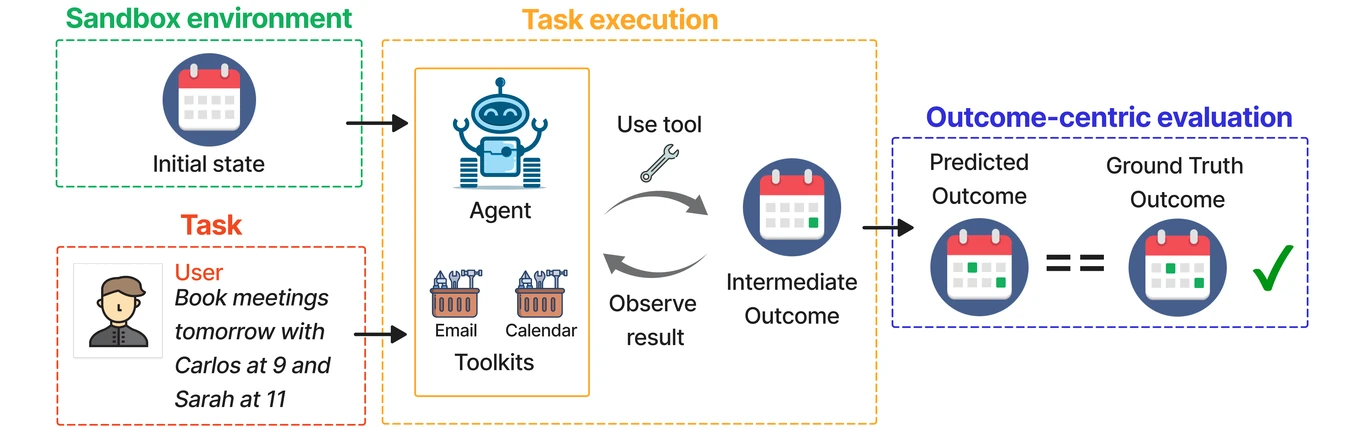
<figure>
  <a href="/assets/images/blog/workbench-pipeline.webp" aria-label="Open the WorkBench pipeline figure at full size">
    <img src="/assets/images/blog/workbench-pipeline.webp" alt="WorkBench sandbox, tool execution, and outcome-centric evaluation pipeline" width="1360" height="430" />
  </a>
  <figcaption>WorkBench's sandbox execution and outcome-centric evaluation flow. Source: <a href="https://github.com/olly-styles/WorkBench">WorkBench</a> (MindsDB, MIT License). Select the figure to view it at full size.</figcaption>
</figure>

<h2 id="motivation">Motivation</h2>

<p>WorkBench executes tool calls in a sandbox and evaluates the resulting environment state. Two observations from reproducing CoA motivated this experiment.</p>

<h3 id="failures-with-side-effects">Failures with side effects</h3>

<p>I distinguish two kinds of failure:</p>

<ul>
  <li><strong>E1:</strong> failures without side effects.</li>
  <li><strong>E2:</strong> failures that create side effects inconsistent with the target state.</li>
</ul>

<p>CoA-v1 raises accuracy from 38.35% to 73.63% relative to SingleAgent, while E2 also rises from 5.19% to 24.15%. E2 accounts for about 92% of CoA-v1 failures. Stronger tool use therefore brings a second concern alongside task completion: changing the environment in the wrong way.</p>

<h3 id="plan-induced-trajectory-inertia">Plan-induced trajectory inertia</h3>

<p>Once a plan is fixed, later tool choices are conditioned on it. If reflection only appends a judgment to the trajectory without invalidating the old <code class="language-plaintext highlighter-rouge">plan</code>, subsequent actions can still follow that plan. When the error is in the plan itself, reflection alone cannot change the direction of the trajectory.</p>

<p>This suggests two requirements: intercept inappropriate calls before execution, and discard the old plan when a call is rejected.</p>

<h2 id="reflection-and-replanning">Reflection and replanning</h2>

<p>DR-CoA (Dual-Reflection CoA) adds reflection before and after each tool call. A rejection before execution requires replanning.</p>

<ol>
  <li><strong>Propose a call.</strong> Store the candidate tool call as <code class="language-plaintext highlighter-rouge">pending_tool</code>.</li>
  <li><strong>Check before execution.</strong> <code class="language-plaintext highlighter-rouge">pre-reflect</code> checks task and plan alignment, necessity and redundancy, parameter validity, and prerequisites for actions with side effects.</li>
  <li><strong>Allow or replan.</strong> An <code class="language-plaintext highlighter-rouge">allow</code> decision executes the call. A <code class="language-plaintext highlighter-rouge">replan</code> decision discards <code class="language-plaintext highlighter-rouge">pending_tool</code>, invalidates the old <code class="language-plaintext highlighter-rouge">plan</code>, and returns to planning.</li>
  <li><strong>Check the outcome.</strong> After execution, <code class="language-plaintext highlighter-rouge">post-reflect</code> checks whether the observation supports the current plan. If it does not, the system returns to <code class="language-plaintext highlighter-rouge">plan</code>.</li>
</ol>

<p>A rejected call commonly exposes an issue in task interpretation, ordering, or dependencies rather than a single bad parameter. Making replanning an explicit state transition is intended to break this trajectory inertia.</p>

<h2 id="results-on-workbench">Results on WorkBench</h2>

<p>All systems use <code class="language-plaintext highlighter-rouge">deepseek-v4-flash</code> as the underlying model. DR-CoA-v2 adds phase-specific prompts to the v1 state machine. Acc denotes accuracy; E1 and E2 are the failure categories defined above.</p>

<table>
  <thead>
    <tr>
      <th>System</th>
      <th style="text-align: right">Acc</th>
      <th style="text-align: right">E1</th>
      <th style="text-align: right">E2</th>
    </tr>
  </thead>
  <tbody>
    <tr>
      <td>SingleAgent</td>
      <td style="text-align: right">38.35%</td>
      <td style="text-align: right">56.46%</td>
      <td style="text-align: right">5.19%</td>
    </tr>
    <tr>
      <td>CoA-v1</td>
      <td style="text-align: right">73.63%</td>
      <td style="text-align: right">2.22%</td>
      <td style="text-align: right">24.15%</td>
    </tr>
    <tr>
      <td>DR-CoA-v1</td>
      <td style="text-align: right">84.34%</td>
      <td style="text-align: right">2.52%</td>
      <td style="text-align: right">13.14%</td>
    </tr>
    <tr>
      <td>DR-CoA-v2</td>
      <td style="text-align: right"><strong>85.03%</strong></td>
      <td style="text-align: right">3.01%</td>
      <td style="text-align: right">11.96%</td>
    </tr>
  </tbody>
</table>

<p>Compared with CoA-v1, DR-CoA-v2 raises accuracy from 73.63% to 85.03% and lowers E2 from 24.15% to 11.96%.</p>

<h2 id="interpretation-and-limitations">Interpretation and limitations</h2>

<p>The change cannot be attributed entirely to replanning: DR-CoA also introduces pre- and post-reflection and state constraints, and v2 changes the prompts. This comparison measures the combined system rather than the isolated effect of replanning.</p>

<p>The results support trying a return to <code class="language-plaintext highlighter-rouge">plan</code> when a proposed action with side effects is judged inappropriate, before patching the existing trajectory.</p>]]></content><author><name>{&quot;bold&quot;=&gt;true}</name></author><category term="agents" /><category term="tool-use" /><category term="reflection" /><category term="workbench" /><summary type="html"><![CDATA[An experiment on tool-call side effects and plan revision in WorkBench.]]></summary></entry></feed>