State is usually the hardest part of a multi-agent development workflow, not model capability: where a task is, who is waiting for whom, and how to resume after a failure. If that state lives only in the session of a Captain (as in dsh-agent-teams), the workflow starts to drift. dsh-auto-workflow is meant to solve this.
It is a DeepSeek Harness plugin: agents, commands, HTTP requests, and Human decisions live in one graph; a new task enters as an independent packet, and when one packet waits for a Human decision, other packets keep running. The plugin itself is a generic node-graph runtime; Git, PRs, and requirement priorities live in the example application.
How it runs
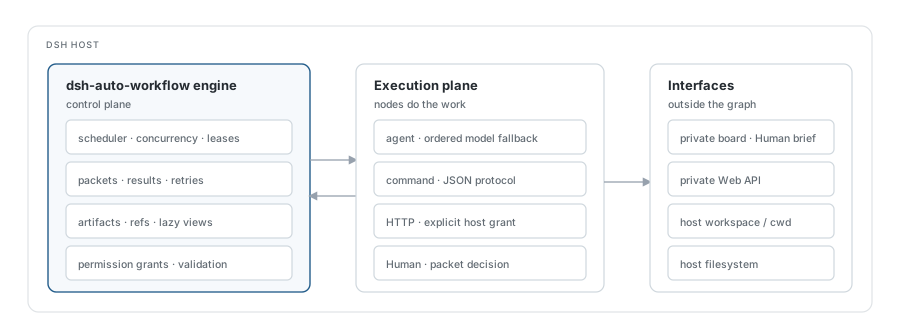
Structurally, a workflow is split into three layers: run, packet, and token. A run is a persistent execution container bound to an immutable project directory and a frozen node graph. A packet is one independent input and its graph execution, with its own result and terminal state. A token is one execution of a node by a packet. Node services are long-lived worker pools; their state moves between running, idle, and disabled, and they do not exit when a task completes.
These three layers determine scheduling. New tasks enter an existing run as packets, and packets are isolated from each other. Nodes take tokens from their queues up to their concurrency limits. A Human wait does not occupy a worker slot or block other packets, so a task waiting for approval does not stall the run.
As a packet moves through the graph, nodes perform the work: an agent invokes a model subtask, a command runs a shell command, HTTP makes a request, and Human waits for a decision. Edges route on outcomes; fanout creates concurrent branches, join aggregates them, and gate controls pacing. Inputs are mapped through $input, $prev, $nodes.<id>.output, and related expressions; a dynamic worktree path can come from the previous node’s output instead of being hard-coded.
Scheduling state, graph definitions, artifacts, and history are persisted; checkpoints store references, while large objects stay in business files. Command and HTTP nodes are denied by default and require explicit grants; agent tool permissions are configured separately. Humans inspect details and decide through a private board with a token. The result is that workflow state no longer depends on the Captain’s context; the run owns it.
Interruption semantics follow from the same model. Persistence is not automatic recovery: after a Host stop or an interrupted execution, running work is retained as evidence and is not silently replayed. Recovery requires a human to inspect side effects and resume explicitly. This keeps the runtime from treating uncertain side effects as recovered and puts recovery responsibility back on the operator.
The development flow in the repository
The runtime does not bind itself to a business process. The repository includes a complete GitHub project development flow to show how the runtime carries real work. After cloning a project, each requirement gets a stable ID, an isolated auto/req-* branch, an isolated worktree, and a draft PR. A snapshot compresses the branch into a single commit; a reviewer reviews that exact commit; a brief produces a structured summary shared by the Human decision and the PR. Once the PR is ready, external Codex or a human can merge it directly, and the workflow only verifies and cleans up.
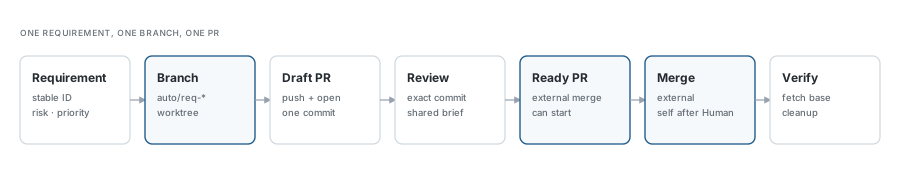
The example uses a 3+3 pool: at most three engineers and three reviewers, with one reviewer per requirement; root concurrency is six, and commands and the miner also consume those slots. Requirements come from two sources: user intake has priority 0 and enters development directly; requirements mined from existing evidence seeds have priority 1..9, with low-risk items entering directly and mid/high-risk items going through Human requirement approval.
A requirement roughly moves through: prepare creates the branch and worktree; begin-engineering enters the engineer pool; snapshot produces one commit; publish-pr opens the draft PR; the reviewer reviews; brief produces the summary; ready-pr marks the PR ready; external merge, or Human-approved self-merge after a grace period; check-pr verifies the review commit is in base; then the worktree and local branch are cleaned up.
The example shows what the runtime can carry: continuous intake, concurrent development, multiple Human gates, an external PR process, and verifiable merges. The plugin core does not handle Git or PRs; those live in the example code. Swap in your own graph, roles, and merge policy without changing the runtime.
Code, full documentation, and the example are in the GitHub repository; the project page is at lyingloong.github.io/dsh-auto-workflow.